Getting help
How to reach the network when something does not work as expected.
There are two ways to reach the network, and both arrive in the same inbox.
The contact form
The Contact page carries a form with four required fields — first name, last name, email address and message — plus an optional field for the name of your organisation.
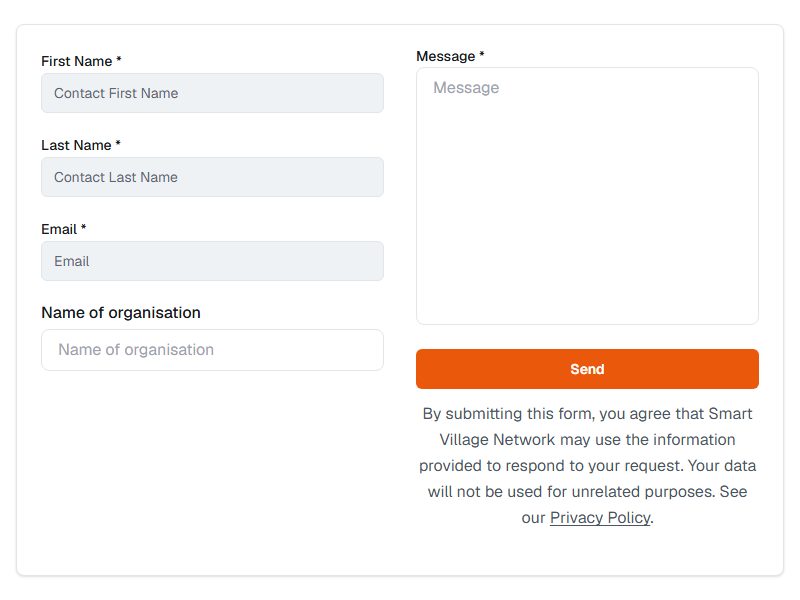
- Complete the required fields.
- Choose Send.
- Wait for the confirmation. The page reports that your message has been sent.
If a required field is empty the page says so and asks you to complete it. If sending fails, the page explains that the message could not be sent and shows the email address to use instead — your text is not lost, but you will need to send it again.
By email
You can write directly to info@smart-village-network.eu. The sign-in, sign-up, invitation and password-reset pages each end with a Need help? box linking to the same address and to the Contact page, so you do not have to go looking for them while you are locked out.
Tip When you write about a problem, include your email address as registered, the page you were on, and what you expected to happen. That is usually enough for a support request to be answered in one exchange.
Before you write
Some questions are answered by this guide:
| Question | Where to look |
|---|---|
| I have no account and want one | Joining Smart Village Network |
| I cannot sign in | Signing in |
| I have lost my password | Resetting your password |
| I cannot find a page or a section | What you can do on Smart Village Network |
| I cannot edit my organisation | Managing an organisation or community profile |
Warning Never send your password by email. Nobody at Smart Village Network will ask you for it. A reset code is meant to be entered on the website, not forwarded to anyone.